SilentWitness — Complete Setup & Usage Guide
Written so **anyone** can follow it — you do not need to be a developer. If you can copy a
Written so anyone can follow it — you do not need to be a developer. If you can copy a command and press Enter, you can run a full AI forensic investigation with this guide. Every step says what to type, what you'll see, and what to do if it goes wrong.
If you are a judge: jump to §8 "For judges" for the fastest path and where every required artifact lives.
1. What this tool does (30-second version)
You give SilentWitness a Windows forensic image (a disk and/or memory capture). It:
- Parses the evidence once into a fast searchable index.
- Investigates it like a senior analyst — forming hypotheses, searching for evidence, and writing down findings that quote the actual evidence.
- Checks itself — it can't make a claim it can't prove, and it won't stop until it has answered all five investigative questions (who/what/where/how/when).
- Produces a report you can read, plus logs that trace every finding back to the exact search that produced it.
2. What you need before you start
| Requirement | Why | How to get it |
|---|---|---|
| A SANS SIFT Workstation (2026) | The forensic OS this runs on | Download the free OVA from https://sans.org/tools/sift-workstation and import it into VirtualBox/VMware. ~10 min. |
| An LLM API key | The AI "brain" (model-agnostic) | An OpenAI key (OPENAI_API_KEY) or an Anthropic key (ANTHROPIC_API_KEY). You use your own key — the tool calls the model on your behalf. |
| A forensic image | The evidence to investigate | E.g. the SANS Find Evil! ROCBA case (.E01 disk). Any Windows E01/raw disk works. |
| ~100 GB free disk | Extracted artifacts + index | The image is large; parsing extracts a working copy. |
You do not need to install Python, forensic tools, or dependencies by hand — the installer does all of it.
3. Install (one command)
Open a terminal in your SIFT VM and run:
curl -fsSL https://raw.githubusercontent.com/Blockchain-Oracle/silentwitness/main/install.sh | bashThis installs SilentWitness and every dependency (the forensic parsers, the index engine, the
agent). It finishes with a parser-environment verification check for the Python modules,
log2timeline, psort, and the spaCy entity model. When it finishes you'll have a
silentwitness command.
Check it worked:
silentwitness --helpYou should see a list of commands (register-evidence, prepare, index, investigate, …).
4. Tell it which AI model to use (set your key)
Pick one provider and paste your key in place of the placeholder.
# Option A — OpenAI
export OPENAI_API_KEY="<paste-your-openai-key-here>"
export SILENTWITNESS_MODEL="openai-chat:gpt-5-mini"   # cost-safe OpenAI investigator model

# Option B — Anthropic (Claude)
export ANTHROPIC_API_KEY="<paste-your-anthropic-key-here>"
export SILENTWITNESS_MODEL="anthropic:claude-sonnet-4-6"
For a deliberate high-recall rerun, use a stronger model only with an explicit cap, for example
silentwitness investigate rocba --max-iterations 120 --max-tokens 8_000_000.
Tip: the key is read from the environment. To make it permanent, add those two lines to the bottom of
~/.bashrcand runsource ~/.bashrc.
5. Run an investigation - the workflow
Each command is one line. We'll use a case named rocba and an evidence file or starter-case
folder at ~/evidence/rocba (change the path to your evidence).
Step 1 - Create the case workspace
silentwitness init rocba --examiner "$USER"What it does: creates cases/rocba/, the empty report, audit directory, evidence registry,
case metadata, and per-case verification salt. This is the project folder for one investigation.
Step 2 - Register the evidence
silentwitness register-evidence rocba ~/evidence/rocbaWhat it does: records what you are investigating, classifies artifact types, computes hashes,
and refuses unsafe writable evidence mounts. If you pass a folder, direct evidence files are
registered and downloaded .sha256 sidecars are skipped. The original evidence is not modified.
What you'll see: a confirmation with the image's SHA-256 hash.
Step 3 - Prepare the artifacts
silentwitness prepare rocbaWhat it does: opens the disk image read-only and copies out the high-value Windows artifacts (event logs, registry, file table, shortcuts, prefetch, etc.). Takes a few minutes. The original image is never modified.
Step 4 - Build the evidence index
silentwitness index rocbaWhat it does: runs the forensic parsers + the Sigma detection engine over the extracted
artifacts and builds a fast searchable index. This is the heavy step. SilentWitness records an
index freshness manifest after a successful build, so an unchanged rerun returns quickly with
index already current; use silentwitness index rocba --force when you intentionally want a
clean rebuild. If you registered a memory image, the default memory profile is tuned for demo
speed: Volatility runs pslist, cmdline, netscan, and psscan with visible per-plugin
progress. The expensive all-process malfind VAD scan is opt-in. For a bounded malware sweep, use
the targeted profile:
silentwitness index rocba --memory-profile targetedThat runs standard inventory first, selects high-signal PIDs from netscan, suspicious command
lines, and psscan-only processes, then runs malfind --pid for that bounded set. The PID cap is
SILENTWITNESS_VOL3_MALFIND_MAX_PIDS (default: 64). For an all-process sweep:
silentwitness index rocba --memory-profile deepSlow plugins are bounded by SILENTWITNESS_VOL3_TIMEOUT_SEC (default: 300 seconds) and become
audit advisories instead of making the terminal look stuck.
What you'll see: progress bars with ETA for artifact parsing, visible plugin-level progress for
memory indexing, a full-text-index build spinner, then a summary like indexed 2,673,733 records
with phase timings and any memory-plugin advisory that needs review.
The default index path uses the targeted parser spine. The slower plaso super-timeline is available when you explicitly want extra breadth:
silentwitness index rocba --with-plasoStep 5 - Investigate
silentwitness investigate rocbaWhat it does: the agent investigates — starting from the staged detections, forming hypotheses, searching the index, and recording cited findings. It will refuse to finish until it has addressed all five Key Questions. Takes a few minutes. What you'll see: a live stream of hypotheses being formed, confirmed, and (when needed) pivoted or challenged by its own critic.
Step 6 - Review the staged findings
silentwitness review rocba          # see the staged findings
silentwitness review rocba --finding-id F-001
What it does: shows the findings the agent staged so the examiner can approve, reject, modify, or skip them before they become report material. The list view prints the next command to inspect one finding in detail. The detail view shows the observation, interpretation, cited audit IDs, caveats, and action prompt.
Step 7 - Approve accepted findings
silentwitness approve rocba F-001What it does: promotes a DRAFT finding into APPROVED report material, signs the
tamper-evident HMAC ledger at /var/lib/silentwitness/verification/<case-id>.jsonl, and updates
cases/rocba/report.md. The password prompt is a case approval signing password, not your
Linux/root password. Reuse the same signing password for every approval in the same case so
silentwitness verify rocba can later reconcile the ledger.
Repeat review --finding-id ... and approve ... for each finding you accept. Reject or skip
findings you do not want in the final report.
Step 8 - Verify the audit trail
silentwitness verify --audit-chain rocbaWhat it does: walks every audit/<backend>.jsonl file and recomputes the hash chain. If an
audit row is missing or edited, this command exits non-zero and tells you where the chain broke.
Step 9 - Export the report
silentwitness export rocba --md
cat cases/rocba/report.md           # the full investigative narrative
cat cases/rocba/findings.json | jq '.[] | select(.status == "APPROVED")'
ls cases/rocba/audit/*.jsonl
What it does: prints the final Markdown report path and shows the machine-readable artifacts
behind it. approve updates the report as findings are accepted; export --md is the stable way
to locate it during a demo. Use --pdf when you want a PDF report. IOC sidecars are attempted only
when you explicitly pass --ioc-format.
(Optional) Score it against known answers
If you have a ground-truth file (we ship one for the ROCBA case):
python -m harness.score_case --case cases/rocba --dataset rocbaWhat you'll see: a recall score and a HIT/MISS line per expected finding.
6. Understanding the output
cases/rocba/report.md— the human-readable investigation: what happened, the evidence, the confidence level, and the gaps the agent itself flagged.cases/rocba/findings.json— every recorded observation, each citing the exact evidence record(s) it's based on.cases/rocba/audit/*.jsonl— the timestamped log of every tool the agent ran. Any finding can be traced back to the exact search that produced it (seeTHREE_CLAIM_TRACE.mdfor a worked example)./var/lib/silentwitness/verification/rocba.jsonl— the HMAC-signed ledger for findings approved by the examiner.
For a GitHub-clickable artifact map, use DEMO_ARTIFACTS.md.
Every claim in the report quotes real evidence. If the AI ever tried to "make something up," the system rejects it before it reaches the report — see the Accuracy Report.
7. If something goes wrong (troubleshooting)
| Symptom | Cause | Fix |
|---|---|---|
silentwitness: command not found | Install didn't finish or shell not reloaded | Re-run the install command; open a new terminal. |
no evidence index for this case | You skipped prepare/index | Run Step 2 then Step 3 before investigate. |
Investigation stops with request_limit | The model needs more steps | Re-run with silentwitness investigate rocba --max-iterations 120. |
Investigation stops with total_tokens_limit | The model consumed the run-wide token budget | Re-run only if needed with a deliberate cap, for example silentwitness investigate rocba --max-tokens 8_000_000. |
authentication / 401 error | API key not set or out of credit | Re-check Step 4; confirm your provider account has credit. |
approval signing password: prompt | The approval ledger needs a signing secret | This is not your Linux/root password. Choose one for the case and reuse it for every approval in that case. |
indexed 0 records | prepare extracted nothing | Confirm the image path is correct and is a Windows disk image. |
index already current | The registered evidence, prepared artifacts, host label, memory profile, and relevant parser settings match the last successful build | Continue to investigate; add --force only when you intentionally want to rebuild. |
vol3 malfind timed out | The optional memory malware scan exceeded the bounded per-plugin timeout | The disk/log/indexed memory inventory is still usable. Re-run with silentwitness index rocba --memory-profile targeted for bounded PID scanning, or SILENTWITNESS_VOL3_TIMEOUT_MALFIND_SEC=0 silentwitness index rocba --memory-profile deep if you want an unbounded all-process sweep. |
| Recall varies between runs | The AI is non-deterministic | Expected — see the Accuracy Report §3; a stronger model gives higher, steadier recall. |
8. For judges
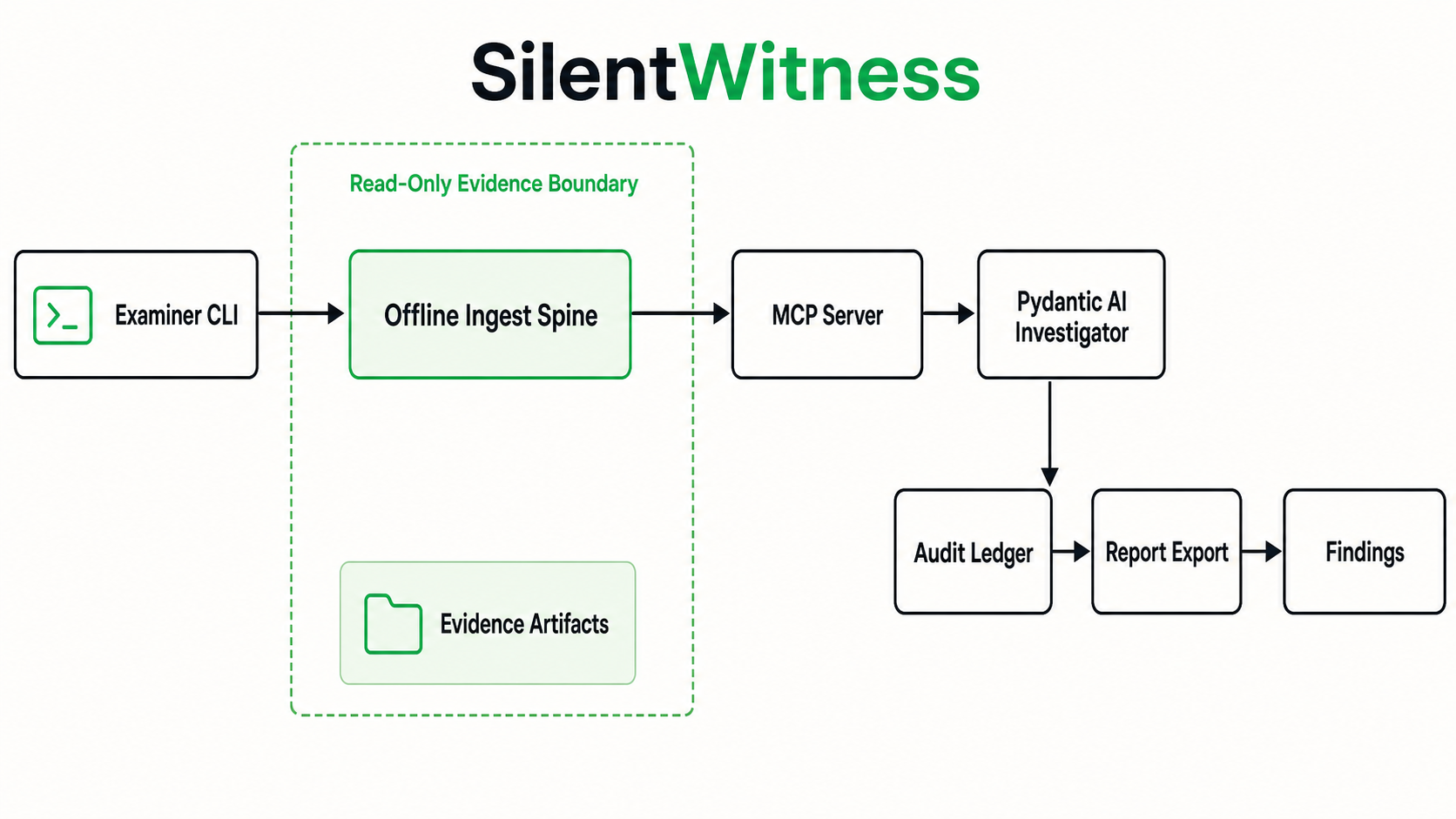
- Fastest path: you do not need to run it — the Accuracy Report, Architecture + diagram, and the showcase runs contain judge-clickable artifacts. If you do run it, follow §3–§5 with your own API key.
- Three-claim trace:
THREE_CLAIM_TRACE.mdwalks three findings from the report → the cited evidence record → the exact audit tool execution (docs/showcase_runs/mr_evil_openai_gpt_5_2_resume/). - Report + JSON artifacts:
DEMO_ARTIFACTS.mdpoints to the committed report, findings JSON, audit JSONL, and approval-ledger examples. - Self-correction in the logs:
docs/showcase_runs/mr_evil_openai_gpt_5_2_resume/audit/critic.jsonlpreserves AGREE/CHALLENGE/REJECT verdicts from the live critic. - Evidence integrity: Accuracy Report §6 — read-only evidence, no write surface, tamper-evident provenance, enforced architecturally.
- Guardrails (architectural, not prompt): the citation gate, entity gate, and coverage gate
live in
silentwitness_mcp/ the agent'soutput_validator— see Architecture. - Starter cases & findings:
STARTER_CASES.md.
9. Where everything lives (map of the repo)
| You want… | Look here |
|---|---|
| How it's built | docs/architecture.md + assets/brand/diagram-A-architecture.png |
| How accurate it is (honest) | docs/ACCURACY_REPORT.md |
| What data it was tested on | docs/STARTER_CASES.md |
| Trace a finding to its tool call | docs/THREE_CLAIM_TRACE.md |
| Report + JSON artifact map | docs/DEMO_ARTIFACTS.md |
| Demo showcase runs | docs/showcase_runs/ |
| The MCP server (the product) | src/silentwitness_mcp/ |
| The agent | src/silentwitness_agent/ |
| The forensic parsers | src/silentwitness_mcp/index/feeders_*.py |
| The coverage gate | src/silentwitness_agent/coverage.py |
| The ground truth + scorer | harness/ |